Automating unstructured IT support intake and ticket routing with AI
AI-Powered IT Support Agent
IT requests reached RYCO's helpdesk as ad-hoc emails and Teams messages with no categorization, routing or SLA tracking, so every request began with manual triage.
Summary
- Challenge
- RYCO's IT helpdesk received a high volume of support requests as unstructured emails and Teams messages, with no consistent categorization, routing or SLA tracking — creating manual triage overhead and slow first response on repetitive issues.
- What I built
- A conversational intake agent in Microsoft Copilot Studio backed by a Power Automate flow: guided slot-filling for issue, requester and urgency, then validation, categorization, team routing, ticket creation in Dataverse and an automatic confirmation email. Separately, a public demo reproducing the same pattern on Groq, Vercel, Supabase and Resend.
- My role
- At RYCO I designed the dialog topics, the automation flow and the Teams deployment. I built the public demo end to end: conversational flow, serverless backend, ticket store and email confirmation.
- Outcome
- Employees describe a problem in chat and receive a ticket ID, assigned team and SLA without filling in a form. The public demo runs the same flow live — creating a real ticket record and sending a real confirmation email — with no RYCO data, endpoints or configuration involved.
Stack
Solo build
- My contribution
- At RYCO I designed the Copilot Studio dialog topics, the Power Automate flow and the Teams deployment, as part of my Technology Officer role. The public demo — conversational flow, serverless backend, ticket store and email confirmation — I built end to end.
Detailed write-up
Overview
RYCO's IT helpdesk received a high volume of support requests via ad-hoc emails and Teams messages, with no structured intake or routing. I designed and built an automation using Microsoft Copilot Studio (conversational agent) and Power Automate (backend flow) that turns a chat message into a validated, categorized, routed ticket with an automatic confirmation. This case study describes that original design, alongside a public demo I built to showcase the same pattern without exposing any proprietary RYCO data or configuration.
Context
Designed and deployed during my role as Technology Officer at RYCO (Regional Youth Cooperation Office). Because the original implementation is tied to RYCO's Microsoft 365 tenant and cannot be shared publicly, I separately built a from-scratch public demo that reproduces the same conversational-intake → automated-ticket → routed-team → confirmation pattern on a public-friendly stack, with all organization-specific data, endpoints and configuration replaced by anonymized/reconstructed equivalents.
What I owned
At RYCO, I designed the Copilot Studio dialog topics (slot filling for issue description, requester email, urgency), the Power Automate cloud flow (validation, Dataverse ticket creation, category routing, Outlook confirmation), and the Teams deployment. Separately, I designed and built the public demo end-to-end: the Groq-based conversational flow, the Vercel serverless backend, the Supabase ticket store, and the Resend email confirmation.
The problem
IT support requests arrived as unstructured messages across email and Teams, with no consistent categorization, routing, or SLA tracking — creating manual triage overhead and slow first response for common, repetitive issue types.
Requirements
- Guided conversational intake collecting issue description, requester email and urgency
- Automatic validation, categorization and team routing
- Ticket creation in a structured store with an ID returned to the user
- Automatic confirmation (chat + email) with ticket ID, assigned team and SLA
- For the public demo specifically: zero real organizational data, endpoints or credentials
Architecture
Original (RYCO): Employee → Microsoft Teams → Copilot Studio (dialog engine, NLU + slot filling) → Power Automate (validation, routing, ticket creation) → Dataverse (ticket storage) + ITSM system + Outlook (confirmation email). Public demo: the same five-stage shape, with Groq API (system-prompt-driven conversation) in place of Copilot Studio, a Vercel serverless function in place of the Power Automate flow, a Supabase Postgres table in place of Dataverse, and Resend in place of the Outlook connector. See the architecture diagram below.
Implementation
The public demo's frontend is a static chat UI (vanilla JS) that POSTs to a `/api/chat` Vercel function. A system prompt run on Groq's Llama 3.3 70B guides a five-step conversation — greet, collect email, collect issue details, collect urgency, then emit a structured `<TICKET_DATA>` block — which the backend parses, inserts into a Supabase `tickets` table, and confirms via a Resend HTML email, returning the ticket ID and assigned team to the chat UI.
Product screens
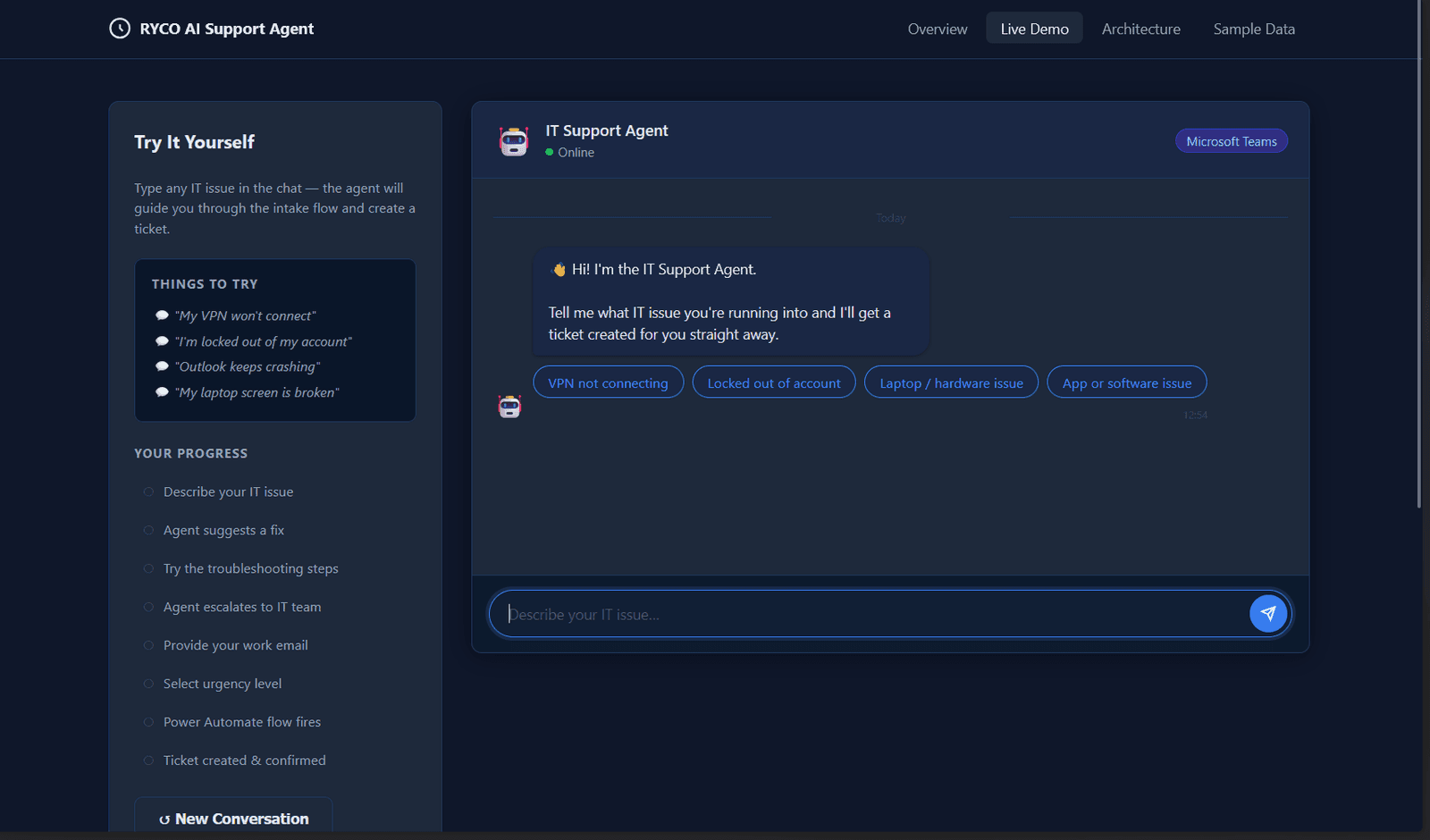
The public demo's intake conversation — quick-reply categories and guided slot-filling.
Add Ticket confirmation screenshot
Chat reply with ticket ID, assigned team and SLA
Add Confirmation email screenshot
The Resend HTML email the demo sends
Architecture and results
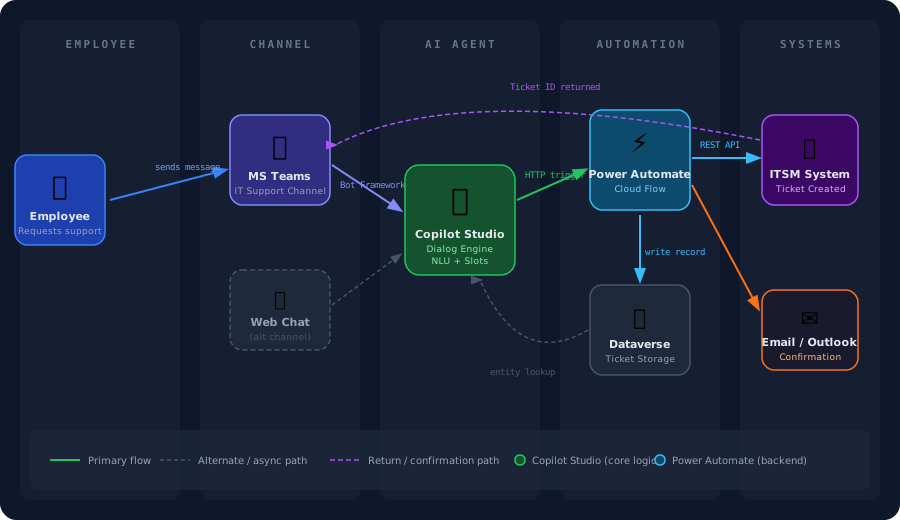
Architecture — employee message through to routed ticket and confirmation, with the original Microsoft stack mapped to its public-demo equivalents.
Technical challenges
Reconstructing the automation pattern for a public audience without carrying over any real RYCO data, internal endpoints, or Microsoft-tenant-specific configuration — while still faithfully representing the actual design (dialog engine → backend flow → structured store → confirmation) — was the main constraint on the demo build.
Solutions
Rebuilt each component with a public-stack equivalent chosen to mirror the real component's role one-to-one (Groq for Copilot Studio's dialog engine, a Vercel function for the Power Automate flow, Supabase for Dataverse, Resend for the Outlook connector), and included an explicit component-mapping table in the demo itself so the correspondence to the original Microsoft-stack design stays transparent rather than implied.
Results
The public demo's own metrics panel is explicitly labeled: figures like “~80% reduction in unstructured intake requests” and “hours → minutes first-response time” are illustrative/representative for this class of automation, not measured production numbers from RYCO — the demo carries this disclaimer directly rather than implying they were measured. What is real: the live demo runs an actual Groq-driven conversation that creates a real row in Supabase and sends a real confirmation email end-to-end.
Lessons learned
Rebuilding the same automation pattern on a completely different stack (Groq/Supabase/Resend instead of Copilot Studio/Dataverse/Outlook) clarified that the pattern itself — guided slot-filling, validation, structured storage, confirmation — is genuinely product-agnostic, not something that only works inside the Microsoft ecosystem.
Future improvements
- Add multilingual support for the conversational intake
- Add SLA-breach escalation alerts, matching the original Outlook-based escalation
- Add analytics on the most common ticket categories to identify further automation candidates
Contact
Let's build
something
useful.
Hiring for AI, data or platform engineering — or building something technically difficult? Tell me what you are working on.
- AI & data engineering
- Forward-deployed / customer-facing engineering
- Applied AI & automation